
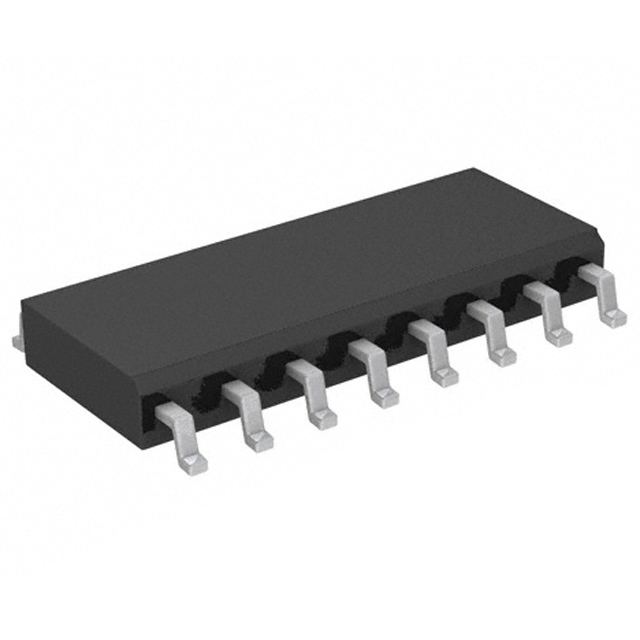
Have you ever faced the challenge of running out of GPIO pins on your microcontroller? The 74HC595D shift register solves this problem by expanding your microcontroller’s output capabilities. It takes serial data and converts it into parallel outputs, making it perfect for controlling multiple devices like LEDs or LCDs with minimal wiring.
This chip enhances your project by simplifying design and improving scalability. Whether you’re working on home automation, robotics, or battery-powered devices, the 74HC595D ensures reliable performance. It maintains signal integrity over long distances and reduces the complexity of your circuit, making it a go-to solution for efficient microcontroller projects.
With the 74HC595D, you can control more devices, save GPIO pins, and streamline your designs. It’s a small chip with big possibilities!
Key Takeaways
The 74HC595D chip helps your microcontroller control more devices. It uses fewer GPIO pins to do this.
This chip makes circuits easier to build and expand. It works well for projects like smart homes and robots.
You can connect many 74HC595D chips together. This lets you control lots of devices with less wiring.
Using PWM with the 74HC595D lets you adjust LED brightness. This creates cool lighting effects for your projects.
The 74HC595D is easy to use, perfect for beginners. It’s great for hobbyists and teachers to improve microcontroller projects.
Overview of the 74HC595D
What is the 74HC595 shift register?
The 74HC595 shift register is a versatile integrated circuit that helps you expand the output capabilities of your microcontroller. It works by taking serial data input and converting it into parallel outputs. This makes it ideal for controlling multiple devices like LEDs, LCDs, or even motors with fewer GPIO pins. Essentially, it acts as a bridge between your microcontroller and the devices you want to control, simplifying your circuit design.
The 74HC595D, a specific variant of this chip, combines an 8-stage serial shift register with a storage register and tri-state outputs. It uses separate clocks for the shift and storage registers, ensuring precise data handling. When the output enable (OE) pin is set to LOW, the data stored in the register is displayed on the output pins.
Key features and advantages of the 74HC595D
The 74HC595D stands out for its speed and efficiency. It operates at a maximum frequency of 55 MHz at 5V, making it suitable for high-speed applications. Its low power consumption, with a maximum current draw of just 4.0 µA, ensures energy efficiency, especially in battery-powered projects. Additionally, it supports a wide supply voltage range (2V to 6V) and operates reliably in temperatures from -40°C to 125°C.
Here are some key advantages:
Provides eight additional output pins per chip.
Supports daisy-chaining for even more outputs.
Features static discharge protection for enhanced reliability.
Comes in a compact SOIC package, ideal for space-constrained designs.
Applications in microcontroller projects
You’ll find the 74HC595D invaluable in a variety of projects. It’s commonly used in LED control systems, where it simplifies the process of managing multiple LEDs. For example, you can use it to create intricate LED displays or control panels. It’s also popular in educational and DIY projects for expanding microcontroller outputs or cascading multiple chips for larger setups.
In real-world applications, the 74HC595D is used in industrial automation, consumer electronics, and automotive systems. Whether you’re building a scoreboard, interfacing with a 7-segment display, or designing a control panel, this chip offers the flexibility and scalability you need.
Pinout and Internal Structure of the 74HC595D
Pinout diagram and explanation
The 74HC595 shift register has 16 pins, each serving a specific purpose. Understanding the pinout is essential for wiring and using this chip effectively. Here’s a quick breakdown of the 74HC595D’s pinout:
Pin | Name | Function |
|---|---|---|
1 | Q1 | Parallel output pin 1 |
2-7 | Q2-Q7 | Parallel output pins 2 to 7 |
8 | GND | Ground connection |
9 | Q7′ | Serial data output for daisy-chaining multiple chips |
10 | MR (Master Reset) | Clears all registers when set to LOW |
11 | SH_CP | Shift register clock input |
12 | ST_CP | Storage register clock input |
13 | OE (Output Enable) | Enables/disables outputs when set to LOW/HIGH |
14 | DS | Serial data input |
15 | Q0 | Parallel output pin 0 |
16 | VCC | Power supply (2V-6V) |
📝 Tip: The Q7′ pin is crucial for daisy-chaining multiple 74HC595 chips, allowing you to expand your outputs even further.
Internal components: storage register, shift register, and output latch
The 74HC595D integrates three key components: an 8-stage serial shift register, a storage register, and tri-state outputs. The shift register handles incoming serial data, moving it one bit at a time with each clock pulse. The storage register temporarily holds this data until it’s ready to be displayed. Finally, the output latch ensures that the data appears on the parallel output pins only when the output enable pin is set to LOW.
This design allows precise control over data flow. The shift register clock (SH_CP) moves data through the shift register, while the storage register clock (ST_CP) transfers it to the storage register. This separation ensures data integrity and prevents glitches during operation.
How the 74HC595D manages serial-in, parallel-out communication
The 74HC595D excels at converting serial data into parallel outputs. Here’s how it works:
You send serial data to the DS pin, one bit at a time.
Each clock pulse on the SH_CP pin shifts the data through the shift register.
Once all 8 bits are loaded, a pulse on the ST_CP pin transfers the data to the storage register.
The output pins (Q0-Q7) display the stored data when the OE pin is set to LOW.
This process makes the 74HC595D a powerful tool for expanding your microcontroller’s output capabilities. You can even daisy-chain multiple chips using the Q7′ pin, enabling you to control dozens of devices with just a few GPIO pins.
Wiring a 74HC595 Shift Register
Required components and tools
Before you start wiring the 74HC595, gather the necessary components and tools. Here’s what you’ll need:
A 74HC595 shift register chip
An Arduino board (like the Arduino Uno)
LEDs (up to 8 for testing purposes)
Resistors (220 ohms for each LED)
Breadboard and jumper wires
A USB cable to connect the Arduino to your computer
Having these items ready will make the process smoother.
Step-by-step guide to wiring the 74HC595D
Wiring a 74HC595 shift register to your Arduino board is straightforward. Follow these steps to ensure proper connections:
Connect pin 8 of the 74HC595 to ground (GND).
Connect pin 16 to the 5V power supply from the Arduino.
Attach the DS pin (pin 14) to a digital pin on the Arduino for serial data input.
Connect the SH_CP pin (pin 11) to another digital pin for the clock signal.
Use the ST_CP pin (pin 12) for the latch signal and connect it to a digital pin.
Attach LEDs to the output pins (Q0-Q7) through resistors to limit current.
💡 Tip: Double-check your connections to avoid wiring errors that could damage your components.
Circuit diagram for connecting the 74HC595D to an Arduino
Here’s a quick reference table for connecting the 74HC595D to an Arduino:
Pin Number | Function | Arduino Connection |
|---|---|---|
8 | Ground | GND |
16 | Power source | 5V |
DS | Serial data input | Digital Pin (e.g., 2) |
SH_CP | Clock for data flow | Digital Pin (e.g., 3) |
ST_CP | Latch for output transfer | Digital Pin (e.g., 4) |
When wiring, ensure the voltage and current ratings match between the Arduino and the 74HC595. This prevents performance issues and keeps your circuit safe.
Once everything is connected, you can upload a simple Arduino code to test the setup. For example, you can write a code to shift data through the register and light up the LEDs in sequence. This tutorial will help you get started with controlling LEDs and understanding how the 74HC595 works.
Practical Examples with the 74HC595D
Controlling LEDs with the 74HC595D
Circuit setup for LED control
If you’ve ever wanted to control eight LEDs with just a few GPIO pins, the 74HC595 shift register makes it easy. Here’s how you can set up the circuit:
Connect the 74HC595’s GND pin (pin 8) to your Arduino’s ground.
Attach the VCC pin (pin 16) to the Arduino’s 5V power supply.
Link the DS pin (pin 14) to a digital pin on the Arduino for serial data input.
Connect the SH_CP pin (pin 11) to another digital pin for the clock signal.
Use the ST_CP pin (pin 12) for the latch signal and connect it to a third digital pin.
Attach LEDs to the output pins (Q0-Q7) through 220-ohm resistors to limit current.
This setup allows you to control eight LEDs using only three GPIO pins on your microcontroller. It’s efficient and scalable, especially for projects like LED patterns or displays.
Arduino code for shifting data to control LEDs
Once your circuit is ready, you can upload a simple program to your Arduino. Here’s an example code snippet to light up the LEDs in sequence:
int dataPin = 2;   // DS pin
int clockPin = 3;  // SH_CP pin
int latchPin = 4;  // ST_CP pin

void setup() {
  pinMode(dataPin, OUTPUT);
  pinMode(clockPin, OUTPUT);
  pinMode(latchPin, OUTPUT);
}

void loop() {
  for (int i = 0; i < 256; i++) { // Loop through 8-bit values
    digitalWrite(latchPin, LOW);
    shiftOut(dataPin, clockPin, MSBFIRST, i); // Send data to the shift register
    digitalWrite(latchPin, HIGH);
    delay(200); // Adjust delay for LED patterns
  }
}
This program uses the shiftOut function to send data to the 74HC595. Each bit in the data byte corresponds to an LED, creating dynamic patterns. You can modify the delay or data values to experiment with different LED patterns.
Expanding I/O pins for peripherals
Circuit setup for I/O expansion
The 74HC595 is perfect for expanding GPIO pins when working with peripherals like LED matrices, relays, or display segments. To expand your outputs, follow these steps:
Connect the microcontroller’s serial data pin to the DS pin of the 74HC595.
Link the SH_CP and ST_CP pins to clock and latch signals, respectively.
Daisy-chain multiple 74HC595 chips by connecting the Q7′ pin of one chip to the DS pin of the next.
Each additional chip adds eight output pins, giving you more flexibility for your project.
This setup simplifies your circuit design and allows you to manage multiple devices with minimal hardware changes.
Code example for managing multiple devices
Here’s an example code to control 16 LEDs using two daisy-chained 74HC595 chips:
int dataPin = 2;
int clockPin = 3;
int latchPin = 4;

void setup() {
  pinMode(dataPin, OUTPUT);
  pinMode(clockPin, OUTPUT);
  pinMode(latchPin, OUTPUT);
}

void loop() {
  digitalWrite(latchPin, LOW);
  shiftOut(dataPin, clockPin, MSBFIRST, 0b10101010); // First chip data
  shiftOut(dataPin, clockPin, MSBFIRST, 0b01010101); // Second chip data
  digitalWrite(latchPin, HIGH);
  delay(500);
}
This program sends two bytes of data, one for each chip. You can control up to 16 LEDs or other peripherals, making it ideal for larger projects. Synchronizing the data and clock signals ensures reliable performance.
💡 Tip: Use the 74HC595 shift register library to simplify your code and manage multiple chips more efficiently.
Advanced Applications of the 74HC595D
Using PWM with the 74HC595D for LED brightness control
Pulse Width Modulation (PWM) is a fantastic way to control the brightness of LEDs. With the 74HC595D, you can implement PWM to create dynamic lighting effects or dimming controls. This chip simplifies the process by expanding your microcontroller’s GPIO pins while maintaining precise timing for PWM signals.
To get started, ensure proper connections:
Pin 8 connects to ground, and pin 16 connects to a power source.
Use the DS, SH_CP, and ST_CP pins for managing serial data and clock signals.
Implement accurate timing in your program to achieve smooth PWM transitions.
The 74HC595D is perfect for controlling multiple LEDs in PWM applications. It reduces the number of GPIO pins needed and ensures signal integrity over longer distances. This makes it ideal for large-scale LED displays or intricate lighting systems. For example, you can program your AVR or Arduino to create stunning LED patterns with varying brightness levels.
Daisy-chaining multiple 74HC595D chips for large-scale projects
Need more outputs? Daisy-chaining multiple 74HC595D chips is the solution. By connecting the Q7′ pin of one chip to the DS pin of the next, you can cascade several chips together. Each chip adds eight additional outputs, allowing you to control dozens of LEDs or other devices with just a few GPIO pins.
This method is especially useful for complex projects like LED matrices or control panels. It minimizes the number of microcontroller pins required while maximizing output capabilities. For example, you can use two daisy-chained chips to control 16 LEDs with only three GPIO pins. However, ensure that voltage and current ratings match across all chips to avoid performance issues.
Benefits of the 74HC595D in professional and hobbyist projects
The 74HC595D offers unique advantages for both professionals and hobbyists. Here’s a quick comparison:
Benefit | Professional Engineers | Hobbyists |
|---|---|---|
Reliability | High | Moderate |
Scalability | Essential | Limited |
Design Efficiency | Critical | Useful |
Power Management | Vital | Optional |
For professionals, the chip’s reliability and scalability are crucial for industrial applications. Hobbyists benefit from its simplicity and ability to expand GPIO pins for creative projects. Whether you’re building a custom LED display or experimenting with a PIC microcontroller, the 74HC595D is a versatile and valuable tool.
The 74HC595D is a game-changer for microcontroller projects, especially when you need to control multiple LEDs or expand output capabilities. It simplifies complex tasks like multiplexing and GPIO management, making it easier to create efficient and scalable designs. Whether you’re building LED patterns, controlling LCDs, or managing home automation systems, this chip ensures reliable performance and smooth data handling.
You’ll find it invaluable for projects that require precise control and efficient power management. Its ability to transition data from serial to parallel formats optimizes GPIO usage, while daisy-chaining expands your output options. From Arduino enthusiasts to professional engineers, the 74HC595D opens up endless possibilities for embedded systems. Why not try it in your next project and see how it transforms your designs?
FAQ
What is the main purpose of the 74HC595D chip?
The 74HC595D expands your microcontroller’s GPIO pins. It converts serial data into parallel outputs, letting you control multiple devices like LEDs or displays with fewer pins. This makes it perfect for projects needing efficient I/O management.
Can I use the 74HC595D with Arduino?
Absolutely! The 74HC595D works seamlessly with Arduino. You can connect it using three GPIO pins for data, clock, and latch signals. It’s great for controlling LEDs, displays, or other peripherals in your Arduino projects.
How many devices can I control with one 74HC595D?
You can control up to eight devices with one chip. By daisy-chaining multiple 74HC595D chips, you can expand this number significantly, controlling dozens of devices with just a few GPIO pins.
Is the 74HC595D suitable for beginners?
Yes, it’s beginner-friendly! The chip is easy to wire and program, especially with platforms like Arduino. With simple code examples, you can quickly learn to control LEDs or expand I/O pins for other devices.
What are some common applications of the 74HC595D?
The 74HC595D is widely used in LED displays, control panels, and I/O expansion for microcontrollers. It’s also popular in robotics, home automation, and educational projects where GPIO pin limitations need solving.
See Also
Key Applications and Insights on the 74HC00DR
The CDCL6010RGZR: A Marvel in Signal Distribution
XC2C128-7VQG100I: Programmable Logic Devices for Embedded Systems
Optimal Performance Through RS-232 Transceiver Options Exploration