
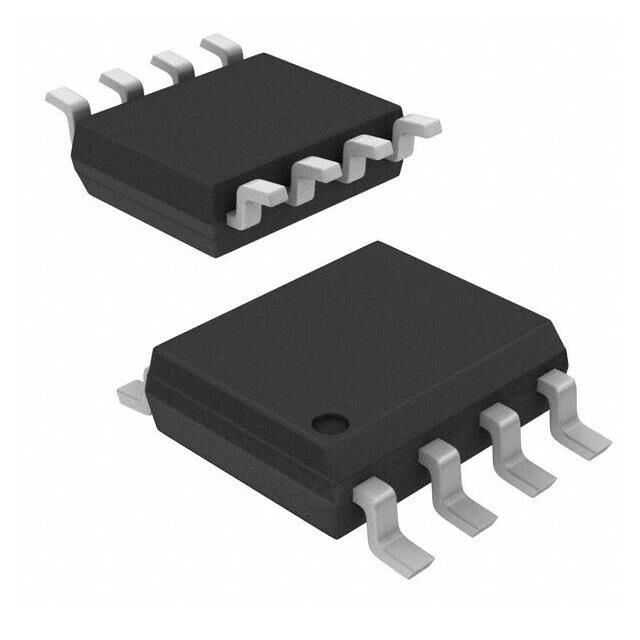
Mastering SPI communication is crucial for optimizing the performance of high-reliability memory chip W25Q32JVSSIQ in embedded systems. By understanding its communication protocols and leveraging its advanced features, you can maximize the chip’s potential.
The W25Q32JVSSIQ, a standout in the W25Q32JV family, offers exceptional speed and reliability. Its compact size and robust design make it an ideal choice for embedded systems requiring efficient data storage and rapid access. Incorporating the W25Q32JVSSIQ enhances system performance, enabling faster operations, quicker responses, and overall improved functionality.
Key Takeaways
The W25Q32JVSSIQ chip is quick and dependable, perfect for systems needing good data storage.
SPI communication moves data fast between devices using four signals: MOSI, MISO, SCLK, and SS.
To make the W25Q32JVSSIQ work well, connect the hardware properly and match SPI settings to the chip’s needs.
Test your SPI driver often to find problems early and keep data transfer smooth.
Use power-saving tools and data protection to make the W25Q32JVSSIQ chip last longer and work better.
Features and Specifications of W25Q32JVSSIQ
Key Features of the W25Q32JVSSIQ
The W25Q32JVSSIQ is a fast and reliable memory chip. It works well in many embedded systems. Here are its main features:
High-Speed Serial Flash: It transfers data quickly for smooth device communication.
Program-Erase Cycles: Each sector can handle 100,000 cycles, making it durable.
Data Retention: It keeps data safe for over 20 years without issues.
Low Power Consumption: It uses 2.7V to 3.6V and less than 1µA in sleep mode, saving energy.
Wide Operating Temperature Range: It works from -40°C to +85°C, even in tough conditions.
Advanced Security Features: It has OTP and block protection to keep data secure.
These features make the W25Q32JVSSIQ a great choice for many uses.
Specifications That Enhance Embedded Systems Performance
The W25Q32JVSSIQ improves how embedded systems work. Below is a table showing its specifications and benefits:
Feature | Benchmark/Specification | Benefit |
|---|---|---|
Program-Erase Cycles | At least 100K per sector | Makes the chip last longer and stay reliable. |
Data Retention | Over 20 years | Keeps stored data safe for a long time. |
Continuous Read Capability | Smooth operation | Allows fast and steady access to data. |
Addressing Memory | Needs only 8 clocks | Speeds up data transfer by reducing delays. |
Power Supply | 2.7V to 3.6V | Saves energy in devices that need low power. |
Power-down Current | Less than 1µA | Helps batteries last longer in portable gadgets. |
Operating Temperature Range | -40°C to +85°C | Works well in extreme hot or cold environments. |
Security Features | Includes OTP and block protection | Protects important data from being accessed by others. |
These specs show how the W25Q32JVSSIQ makes embedded systems better and more reliable.
Applications of the W25Q32JVSSIQ in Embedded Systems
The W25Q32JVSSIQ is used in many devices because it is strong and advanced. Here are some examples:
Consumer Electronics: It works in smartphones, tablets, and smartwatches for fast memory use.
Industrial Automation: Its durability suits factory systems and remote monitors.
Automotive Systems: It helps in car navigation, entertainment, and safety systems.
IoT Devices: Its small size and low power fit smart home and wearable tech.
Medical Equipment: It stores data safely in devices like patient monitors.
Gaming Consoles: It speeds up loading times for better gaming experiences.
Aerospace and Defense: Its security and toughness work well in extreme conditions.
Data Logging Systems: It records data continuously for things like weather tracking.
Portable Devices: It saves battery life in e-readers and cameras.
Embedded System Prototyping: Developers use it to test new system designs.
The W25Q32JVSSIQ is flexible and dependable, making it useful in many areas. It ensures devices perform well and stay reliable.
Understanding SPI Communication in Embedded Systems
Basics of SPI Communication
SPI (Serial Peripheral Interface) is a common way devices talk. It allows quick and smooth communication between a master device and one or more slave devices. Unlike some other methods, SPI can send and receive data at the same time. This makes it great for tasks needing fast data transfer, like digital sound or phone systems.
SPI uses four main signals:
MOSI (Master Out Slave In): Sends data from the master to the slave.
MISO (Master In Slave Out): Sends data back from the slave to the master.
SCLK (Serial Clock): Keeps data transfer in sync.
SS (Slave Select): Chooses which slave device to talk to.
SPI is simple and works well, making it a top pick for embedded systems.
Components of the SPI Protocol
Each part of SPI helps keep data safe and systems running well:
Full-duplex mode lets devices send and get data at once. This saves time in fast systems.
The serial clock (SCLK) keeps timing accurate, avoiding mistakes in data transfer.
The slave select (SS) pin allows talking to many devices, making SPI flexible.
These features make SPI reliable, especially for memory chips like the W25Q32JVSSIQ.
Why SPI is Ideal for High-Reliability Memory Chips
SPI is perfect for memory chips because it’s fast, easy, and flexible. For instance, the W25Q32JVSSIQ supports SPI speeds up to 133 MHz. Its quad I/O mode works like a clock speed of 532 MHz, which is faster than many other memory chips. SPI also uses little power, matching the energy-saving design of the W25QXX family.
Feature | Specification |
|---|---|
Memory Size | 32 Mbit |
SPI Clock Frequency | Up to 133 MHz |
Quad I/O Equivalent Clock | 532 MHz (133 MHz x 4) |
Power Supply Voltage | 2.7V to 3.6V |
Power-down Current | As low as 1µA |
These details show why SPI is key for memory chips like the W25Q32JVSSIQ, helping embedded systems work their best.
Developing an SPI Driver for W25Q32JVSSIQ
Setting Up the Development Environment
Before creating an SPI driver for the W25Q32JVSSIQ, you must prepare a good development setup. This ensures smooth communication between your system and the memory chip. A proper setup avoids mistakes and keeps data safe during use.
Follow these key setup steps:
Configuration Step | Description |
|---|---|
Resets | Add a reset signal to start the Wishbone bus correctly. |
Aborts | Handle canceled tasks from the CPU or other controllers. |
Acknowledgments | Set up responses for reading data and using the configuration port. |
Options | Use settings like pipelined reads to meet design needs. |
These steps help create a strong setup for building the SPI driver. They also ensure the W25QXX chips work well in different devices.
Writing Initialization Code for SPI
The first step in making an SPI driver is initialization. This sets up how your microcontroller talks to the W25Q32JVSSIQ. You need to adjust the SPI clock speed, data mode, and pin connections to match the chip.
Here’s an example of simple initialization code:
void SPI_Init() {
    // Set SPI clock speed to 133 MHz
    SPI_SetClockSpeed(133000000);

    // Configure SPI mode (Mode 0: CPOL = 0, CPHA = 0)
    SPI_SetMode(SPI_MODE_0);

    // Assign pins for MOSI, MISO, SCLK, and SS
    SPI_SetPins(MOSI_PIN, MISO_PIN, SCLK_PIN, SS_PIN);

    // Enable SPI peripheral
    SPI_Enable();
}
This code helps the SPI driver talk properly with the W25Q32JVSSIQ. By doing this, you set up a strong base for reliable data exchange.
Implementing Read and Write Operations
After setting up SPI, you can add read and write functions. These let your system work with the W25Q32JVSSIQ chip. Writing saves data, while reading gets it back for use.
Writing Data to the W25Q32JVSSIQ
To save data, send a command, the address, and the data. The chip uses SPI to store the data safely. Here’s an example:
void SPI_Write(uint32_t address, uint8_t* data, uint16_t length) {
    SPI_SelectSlave(); // Activate the chip
    SPI_SendCommand(WRITE_COMMAND); // Send write command
    SPI_SendAddress(address); // Specify memory address
    SPI_SendData(data, length); // Send data payload
    SPI_DeselectSlave(); // Deactivate the chip
}
Reading Data from the W25Q32JVSSIQ
To get data, send a read command and the address. The chip will send back the data you asked for. Here’s an example:
void SPI_Read(uint32_t address, uint8_t* buffer, uint16_t length) {
    SPI_SelectSlave(); // Activate the chip
    SPI_SendCommand(READ_COMMAND); // Send read command
    SPI_SendAddress(address); // Specify memory address
    SPI_ReceiveData(buffer, length); // Retrieve data into buffer
    SPI_DeselectSlave(); // Deactivate the chip
}
These functions make handling data easy and reliable. The W25QXX chips’ fast SPI and low power use make these tasks smooth for many devices.
Testing and Validating the SPI Driver
Testing your SPI driver is very important. It ensures the W25QXX chip works well with your system. Testing helps find problems and confirms the driver works in different situations. Follow these steps to test your SPI driver properly.
1. Set Up a Test Environment
Make a safe place to test your SPI driver. Use a board with a microcontroller that supports SPI. Connect the W25QXX chip to the board. Make sure the MOSI, MISO, SCLK, and SS pins are set up correctly. Use tools like a logic analyzer or oscilloscope to check SPI signals. These tools help you see if data transfers are correct.
2. Verify Initialization
Test the setup code first. Check if the SPI clock speed, mode, and pin settings match the W25QXX chip’s needs. Use debug messages or lights to confirm the SPI is ready. If it doesn’t work, check your code for mistakes.
3. Test Basic Read and Write Operations
Try simple read and write tasks to check the driver. Write some data to a memory address on the W25QXX chip. Then, read it back to see if it matches. For example:
uint8_t testData[4] = {0xAA, 0xBB, 0xCC, 0xDD};
uint8_t readBuffer[4];

// Write data to address 0x000000
SPI_Write(0x000000, testData, 4);

// Read data back from address 0x000000
SPI_Read(0x000000, readBuffer, 4);

// Compare written and read data
if (memcmp(testData, readBuffer, 4) == 0) {
    printf("Read/Write Test Passedn");
} else {
    printf("Read/Write Test Failedn");
}
This test shows if your SPI driver can move data without problems.
4. Stress Test the SPI Driver
Test the driver by using it a lot. Write and read large amounts of data many times. Try different SPI clock speeds to see how it performs. Watch the power use of the W25QXX chip during these tests. Make sure it stays within safe limits.
5. Test Advanced Features
If your project uses special features of the W25QXX chip, test those too. For example, try the block protection feature. Write to a protected area and check if it stops the operation as it should.
6. Validate Error Handling
Create errors on purpose to test your driver’s strength. For example, disconnect the W25QXX chip or send wrong commands. See if the driver notices the errors and handles them well. Good error handling keeps your system stable.
7. Document the Results
Write down what you did and what happened during testing. Note any problems and how you fixed them. This record helps you improve and is useful for future projects.
Tip: Always test your SPI driver on the real hardware it will use. Simulations are helpful, but real-world tests ensure everything works correctly.
By following these steps, you can make sure your SPI driver works well with the W25QXX chip. A tested driver improves performance and lowers the chance of system failures.
Practical Use of W25Q32JVSSIQ in Embedded Systems
Connecting the Hardware and Pin Setup
To connect the W25QXX chip to your system, you need to set up its pins correctly. Each pin has a specific job to make sure the chip works well and saves power. Here’s a table explaining what each pin does:
Pin Number | Pin Name | What It Does |
|---|---|---|
1 | CS# | Turns the chip on; helps save power. |
2 | DO | Sends data from the chip to the microcontroller. |
3 | WP# | Stops accidental data changes; keeps data safe. |
4 | GND | Gives a steady voltage base; keeps the chip stable. |
5 | DI | Sends data to the chip; supports flexible data use. |
6 | CLK | Keeps data timing correct; ensures smooth communication. |
7 | HOLD# | Pauses data transfer when needed. |
8 | VCC | Powers the chip; helps manage energy use. |
When connecting the chip, make sure the pins match your microcontroller. If they don’t, the chip might not work right or could waste power. Use a tool like a logic analyzer to check if the signals are working properly.
Power Needs and Tips
The W25QXX chip works with voltages between 2.7V and 3.6V, making it great for devices that need low power. In sleep mode, it uses less than 1µA, which helps batteries last longer. To save power, connect the VCC pin to a steady power source and make sure the GND pin is stable. Avoid power changes, as they can make the chip act up.
For systems that need to work for a long time, add capacitors near the VCC pin. These help reduce noise and keep the power steady. This simple step can stop sudden resets and make the system more reliable.
Sample Code for Basic Tasks
Here’s some example code to show how to use the W25QXX chip. These functions let you save and get data easily:
Saving Data
void SPI_Write(uint32_t address, uint8_t* data, uint16_t length) {
    SPI_SelectSlave(); // Turn on the chip
    SPI_SendCommand(WRITE_COMMAND); // Send a command to save data
    SPI_SendAddress(address); // Pick where to save the data
    SPI_SendData(data, length); // Send the data to the chip
    SPI_DeselectSlave(); // Turn off the chip
}
Getting Data
void SPI_Read(uint32_t address, uint8_t* buffer, uint16_t length) {
    SPI_SelectSlave(); // Turn on the chip
    SPI_SendCommand(READ_COMMAND); // Send a command to get data
    SPI_SendAddress(address); // Pick where to get the data from
    SPI_ReceiveData(buffer, length); // Get the data and store it
    SPI_DeselectSlave(); // Turn off the chip
}
These functions are quick and work well. They are a good starting point for using the W25QXX chip in your system.
Adding the Chip to Your Embedded System
Adding the W25Q32JVSSIQ to your system needs good planning. This helps the chip work well and fit your project’s needs. Follow these steps for a smooth setup.
Know Your System Needs
First, figure out what your system needs. Check how much memory, speed, and power it requires. The W25Q32JVSSIQ has 32 Mbit of storage, which is great for medium memory needs. Its low power use is perfect for devices like IoT gadgets or medical tools.Set Up Hardware Connections
Link the chip to your microcontroller using SPI. Make sure MOSI, MISO, SCLK, and CS# pins are connected right. Use a steady power source between 2.7V and 3.6V for the VCC pin. Add small capacitors near the power pins to cut noise and keep things stable.Write Software Code
Create code to set up SPI communication. Match the clock speed and data mode to the chip’s needs. Add read and write functions to move data. Test these with small data to make sure they work correctly.Check the Setup
Test how the chip works in your system. For example, see if it can log data in factory systems. Use its 4KB sectors to save settings easily. Test its use in smart home devices for firmware updates with little downtime.
By following these steps, you can add the W25Q32JVSSIQ to your system successfully. Its strong features and low power use make it useful for many projects.
Tip: Use a logic analyzer to check SPI signals during tests. This tool helps fix problems fast.
Debugging and Optimizing SPI Communication
Finding and Fixing Common Problems
SPI communication can have issues like wrong wiring or mismatched settings. These problems may stop your microcontroller from talking to the W25QXX chip. To fix this, check all hardware connections first. Make sure the MOSI, MISO, SCLK, and CS# pins are connected properly. Use a multimeter to test for correct voltage and wire connections.
Diagnostic data can also help solve problems faster. Below is a table showing types of diagnostic data and their uses:
Type of Diagnostic Data | Purpose |
|---|---|
Required Diagnostic Data | Improves products, solves issues, and helps with device compatibility. |
Optional Diagnostic Data | Finds problems quickly by showing extra details about device health. |
Fixing these problems step by step ensures better communication and reliable data transfer.
Tools to Debug SPI Communication
Debugging tools are important for fixing SPI problems. A logic analyzer is great for checking SPI signals like MOSI, MISO, SCLK, and CS#. It shows real-time data to find timing errors or wrong transfers. Oscilloscopes are helpful for checking signal quality and voltage levels.
For software debugging, use tools in your coding program. These let you check your code step by step. You can confirm if commands sent to the W25QXX chip are correct. Using both hardware and software tools gives a complete way to solve SPI issues.
Improving Speed and Reliability
To make SPI communication faster and more reliable, match voltage levels between devices. This helps signals stay clear. Set the SPI clock speed to match the slowest device. This avoids timing errors and saves power.
Keep signals strong by using shielded cables and ground planes. Design circuit boards to reduce interference. Set the right clock polarity and phase for smooth operation. Check timing to meet setup and hold requirements. These steps make the W25QXX chip work better in your system for many uses.
Tip: Test your system often in different conditions to keep it reliable.
Best Practices for Long-Term Use of W25Q32JVSSIQ
To keep the W25Q32JVSSIQ working well for a long time, follow these simple tips. These steps will help the chip stay efficient and last longer.
Watch Operating Temperatures: Use the chip only in its safe range (-40°C to +85°C). Too hot or cold can harm it and lower its performance.
Limit Program-Erase Cycles: Each sector can handle up to 100,000 cycles. Plan your tasks to avoid extra writing. This stops the chip from wearing out too soon.
Use Power-Saving Modes: Take advantage of sleep mode to save energy. This is very helpful for devices that run on batteries.
Secure Important Data: Turn on block protection and OTP features to keep data safe. These are great for sensitive uses like medical tools or factory systems.
Test and Update Often: Check the chip’s functions and update firmware regularly. This keeps it working with new applications and avoids problems.
Tip: Add capacitors near power pins to steady voltage and cut noise. This can stop sudden resets and make the chip more reliable.
Maintenance Checklist
Task | How Often | Why It’s Important |
|---|---|---|
Check temperature range | Every month | Avoid damage from extreme heat or cold. |
Test read/write operations | Every 3 months | Make sure data stays correct and usable. |
Update firmware | Once a year | Keep it working with new technologies. |
Inspect power connections | When needed | Prevent power issues or failures. |
By following these easy steps, you can make the W25QXX chip work better for longer. Whether it’s in smart gadgets, cars, or other devices, these tips ensure it stays dependable.
Understanding SPI communication is key to using the W25Q32JVSSIQ memory chip well. This chip is fast and strong, making it great for handling data. It can run at speeds up to 133MHz, with a quad I/O clock rate reaching 532MHz. This allows data to move quickly, up to 66MB per second. The chip is built to last, with each sector handling 100,000 program-erase cycles and keeping data safe for over 20 years.
Feature | Specification |
|---|---|
SPI Clock Frequency | Up to 133MHz |
Equivalent Dual I/O Clock Rate | 266MHz (133MHz x 2) |
Equivalent Quad I/O Clock Rate | 532MHz (133MHz x 4) |
Continuous Data Transfer Rate | 66MB/S |
Program-Erase Cycles | Min. 100K per sector |
Data Retention | More than 20 years |
To get the most out of this chip, learn its features and how SPI works. Build a good driver and use it properly in your system. This will improve how the W25Q32JVSSIQ works in your projects. Use it in devices like IoT gadgets or factory machines to make them better and faster.
Tip: Test the chip often and update its firmware. This keeps it working well for a long time.
FAQ
Why is the W25Q32JVSSIQ good for embedded systems?
The W25Q32JVSSIQ is fast, uses little power, and keeps data safe. It works in hot or cold places and has strong security. This makes it great for IoT gadgets, car systems, and factory machines.
How can you make SPI communication work well with the W25Q32JVSSIQ?
To make SPI work well, match the clock speed and mode to the chip. Check that MOSI, MISO, SCLK, and CS# are connected right. Use tools like logic analyzers to check signals and fix problems.
Can the W25Q32JVSSIQ be used in devices with batteries?
Yes, the W25Q32JVSSIQ is perfect for battery devices. It uses less than 1µA in sleep mode and works at low voltages (2.7V to 3.6V). These features help batteries last longer in gadgets like smartwatches and e-readers.
What tools can fix SPI communication problems?
A logic analyzer can check SPI signals like MOSI, MISO, SCLK, and CS#. Oscilloscopes help check signal quality and voltage. Debugging tools in coding programs can find and fix errors in your code.
How do you keep data safe on the W25Q32JVSSIQ?
Turn on block protection and OTP features to keep data secure. These stop others from changing or seeing important data. This makes the chip great for medical tools and defense systems.
Tip: Test and update your system’s firmware often to keep it safe and working well.
See Also
Exploring Memory Expansion Applications In Embedded System Designs
The W25Q256JVEIQ: An Excellent Choice For Embedded Systems
XCF04SVOG20C: The Best Chip For 4Mb Configurations