
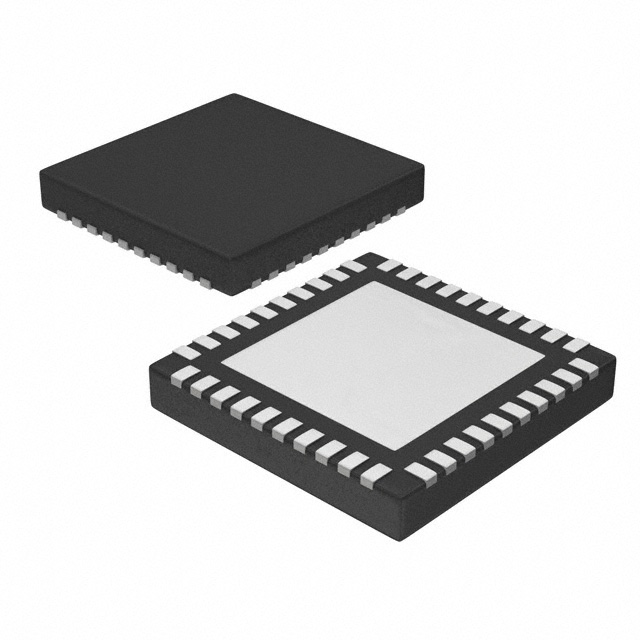
The CC2541F256RHAR is a Bluetooth chip made to save power. It helps build smarter wireless networks and control systems for industries. Its very low power use makes it great for energy-saving tasks.
Why Pick the CC2541F256RHAR?
Power Saving:
Active RX Mode: Uses 17.9 mA
Active TX Mode (0 dBm): Uses 18.2 mA
Sleep Timer Mode: Uses only 1 µA
Performance Details:
Speeds up to 2 Mbps
Receiver sensitivity of –94 dBm at 1 Mbps
These features make it perfect for strong and efficient wireless systems.
Key Takeaways
The CC2541F256RHAR chip uses little power, making it great for saving energy in wireless systems.
It works fast with data speeds up to 2 Mbps and picks up signals well for strong communication.
To set it up, you need special tools like a development board and IAR Embedded Workbench software.
Use low power modes and change RF settings to make batteries last longer and improve communication in IoT devices.
Keep the chip working well by cleaning connections and updating its software regularly.
Overview of CC2541F256RHAR
Key Features and Specifications
The CC2541F256RHAR is a Bluetooth chip that saves energy. It works well for wireless communication and uses very little power.
Here’s a simple list of its features:
Specification | Details |
|---|---|
Memory | 128 KB or 256 KB Flash + 8 KB RAM |
Power Use | RX Mode: 17.9 mA, TX Mode: 18.2 mA, Sleep: 0.5 µA |
RF Features | 2.4-GHz Bluetooth, Speeds: 250 kbps to 2 Mbps, Sensitivity: -94 dBm |
Extras | 23 I/O Pins, 12-Bit ADC, Two USARTs, I2C Support |
Size | 6 mm × 6 mm QFN-40, Works with CC2540 |
Standards | Meets ETSI, FCC, and ARIB rules |
This chip also has security tools like encryption and software protection. These features keep it safe in sensitive places.
To see how the CC2541F256RHAR compares to others, check this chart:
Benefits for Wireless and Industrial Systems
The CC2541F256RHAR is great for wireless networks and industrial systems. Its low power use helps batteries last longer. This makes it perfect for devices in hard-to-reach places.
Main benefits include:
Energy Saving: Low power modes help save battery life.
Strong RF Signals: It keeps communication steady in tough areas.
Fast Processing: The built-in MCU handles hard tasks easily.
Adjustable Settings: You can change power and performance as needed.
Memory Choices: Pick between 128 KB or 256 KB flash memory.
These features make the CC2541F256RHAR a top choice for smart systems. Whether for IoT gadgets or factory tools, this chip offers great performance and reliability.
Setting Up CC2541F256RHAR
Hardware Needs and Connections
To use the CC2541F256RHAR, you need the right tools. This chip needs specific parts to work well in wireless systems.
What You’ll Need:
CC2541F256RHAR Chip: The main part of your wireless setup.
Power Source: A steady 2.0–3.6V DC power supply.
Development Board: Use a board like CC2541DK-MINI for easy testing.
External Antenna: Helps improve signal strength and range.
Connection Ports: Use GPIO, UART, or I2C to link devices.
Connecting the Hardware:
Power Supply: Connect the power to the VDD pin. Keep voltage steady.
Antenna Link: Attach the antenna to the RF port for better signals.
Add Peripherals: Use I/O pins to connect sensors or other devices.
Debugging Tool: Link a tool like SmartRF Flash Programmer to debug pins.
Tip: Check all connections before turning on the system. Wrong wiring can harm the chip.
Software Tools and Setup
After hardware is ready, you need software to program the chip. These tools help you use the CC2541F256RHAR fully.
Important Software Tools:
IAR Embedded Workbench: Write, test, and debug code for the chip.
SmartRF Studio: Adjust RF settings and test wireless performance.
BLE Stack: Add Bluetooth Low Energy features for device communication.
Firmware Libraries: Use TI’s pre-made functions and examples.
Steps to Configure:
Install IDE: Download and set up IAR Embedded Workbench.
Add BLE Stack: Import it to enable Bluetooth features.
Write Code: Create programs in C for communication and power saving.
Test RF Settings: Use SmartRF Studio to tweak frequency and power.
Upload Firmware: Flash your code to the chip with SmartRF Flash Programmer.
Note: Always update software to avoid problems and boost performance.
By following these steps, you can prepare the CC2541F256RHAR. With the right tools, you can build smarter wireless systems.
Applications in Wireless Sensor Networks
IoT and Smart System Use Cases
The Internet of Things (IoT) changes how devices share data. The CC2541F256RHAR helps make smarter systems that connect easily. It works well for IoT because it uses little power and has strong Bluetooth.
Here are ways to use it in IoT:
Smart Home Devices: Make gadgets like smart lights, thermostats, and cameras. These can run for months on one battery.
Wearable Technology: Add it to fitness trackers or health monitors. These send live data to phones.
Asset Tracking: Build systems to track goods in warehouses or trucks.
Environmental Monitoring: Place sensors to check air, temperature, or humidity far away.
Tip: Use sleep modes to save battery life in IoT devices.
The CC2541F256RHAR keeps communication steady in tough places. Its small size and features fit well in tiny IoT gadgets.
Performance Optimization in Sensor Networks
Wireless sensor networks need good communication and energy saving. The CC2541F256RHAR helps with both. Its features improve how sensor networks work.
Steps to Improve Performance:
Adjust RF Settings: Use SmartRF Studio to set frequency and power. This makes signals strong and avoids interference.
Enable Low Power Modes: Set the chip to sleep when sensors aren’t working. This saves energy.
Optimize Data Transmission: Program it to send data in bursts, not all the time. This lowers power use.
Use Built-in Security: Turn on encryption to stop unauthorized access.
Example Use Case:
Think of temperature sensors in a greenhouse. With the CC2541F256RHAR, you can:
Check conditions live.
Save battery by using sleep modes.
Send data reliably to a central hub.
Note: Update firmware often to keep the chip secure and working well.
By following these tips, you can make sensor networks better and more reliable. The CC2541F256RHAR gives you tools to build smarter systems.
Applications in Industrial Control Systems
System Integration
The CC2541F256RHAR makes it easy to connect devices in factories. It works well with many gadgets and keeps communication smooth. This chip handles different data speeds, from 250 kbps to 2 Mbps. It performs reliably even in noisy places, thanks to its strong receiver sensitivity of –94 dBm.
Here’s a simple look at its features:
Feature | Description |
|---|---|
RF | 2.4-GHz Bluetooth Low Energy and Custom RF Chip |
Data Rates | Handles 250-kbps, 500-kbps, 1-Mbps, 2-Mbps Speeds |
Link Budget | Great Link Budget for Long-Range Use Without Extra Parts |
Output Power | Adjustable Output Power up to 0 dBm |
Receiver Sensitivity | Strong Receiver Sensitivity (–94 dBm at 1 Mbps) for Clear Signals |
Compliance | Meets Global Radio Frequency Rules |
It also has a fast 8051 microcontroller, flash memory you can program, and tools for debugging. These features make it simple to add to existing setups.
Tip: Adjust the output power to match your factory’s needs.
Improving Efficiency and Reliability
Factories need systems that save energy and work well. The CC2541F256RHAR does both. Its low-power modes and 8 KB RAM help save energy when devices are idle. This is great for machines that run all the time, like assembly lines or remote monitors.
To keep systems reliable, the chip has smart features like auto-acknowledgment and address decoding. These reduce mistakes in communication. It also follows global radio rules, so your setup stays compliant.
Ways to improve efficiency and reliability:
Use Low-Power Modes: Save energy when devices aren’t active.
Enable Automation: Let the chip handle tasks like acknowledgment.
Adjust Data Speeds: Pick the right speed to balance power and performance.
Follow Rules: Use built-in tools to meet radio regulations easily.
Adding the CC2541F256RHAR to your factory systems boosts performance, saves energy, and ensures reliability. It’s a great choice for modern industrial setups.
Troubleshooting and Best Practices
Fixing Common Problems
Using the CC2541F256RHAR may bring some usual problems. Knowing how to fix them saves time.
Power Supply Problems:
If the chip acts oddly, check the power source. Keep voltage between 2.0–3.6V. Add a capacitor near the VDD pin to steady the power.Weak Signals:
Bad signals can happen if the antenna isn’t connected well. Make sure the antenna is firmly attached to the RF port. Use a good-quality external antenna for better range.Code Errors:
If the chip doesn’t run your program, check the firmware. Ensure you uploaded the right version with SmartRF Flash Programmer. Also, check the debugging tool connections.Too Much Heat:
Overheating might mean wrong wiring or too much voltage. Turn off the power and review your circuit setup.
Tip: Look at the datasheet for more details and fixes.
Care Tips for Long Use
Taking care of the CC2541F256RHAR helps it work well for a long time. Follow these steps to keep it in good shape:
Clean Connections: Dirt can block the pins. Use a soft brush or air spray to clean the chip often.
Stop Voltage Spikes: Watch the power supply to avoid sudden high voltage. Use a voltage regulator if needed.
Update Software: Check for new BLE stack and firmware updates. Updated software makes the chip safer and faster.
Store Safely: Keep the chip in an anti-static bag when not using it. This stops damage from static electricity.
Inspect Regularly: Look at solder joints and connections for wear. Fix loose parts to keep the chip stable.
Note: These tips improve performance and lower the chance of problems.
Fixing issues and caring for the chip keeps wireless systems working well and reliably.
The CC2541F256RHAR is small and saves energy. It works well for wireless and factory systems. Its low RF power use and built-in I2C make it better than the CC2540.
Feature | CC2541F256RHAR | CC2540 |
|---|---|---|
Package Size | 6 mm × 6 mm | 6 mm × 6 mm |
RF Power Use | Lower | Higher |
USB Interface | No | Yes |
Max Output Power in TX | Lower | Higher |
HW I2C Interface | Yes | No |
This chip can make wireless networks and factory systems work better. It helps build smarter setups that save energy and meet today’s needs.
Tip: Try using this chip now to improve your projects!
FAQ
Why is the CC2541F256RHAR great for low-power devices?
This chip uses very little power, only 0.5 µA in sleep mode. It helps batteries last longer, making it ideal for IoT sensors and wearables.
Tip: Turn on sleep modes to save more energy in your projects.
Can the CC2541F256RHAR work for long-distance communication?
Yes, its strong receiver sensitivity of –94 dBm keeps signals clear. Adding a good external antenna can make the range even better.
What tools are needed to program the CC2541F256RHAR?
You’ll need IAR Embedded Workbench for coding and debugging. Use SmartRF Studio to adjust RF settings and BLE Stack for Bluetooth features.
How can I fix weak signal problems?
Check if the antenna is connected tightly to the RF port. Use a high-quality antenna and tweak RF settings in SmartRF Studio to boost signals.
Is the CC2541F256RHAR compatible with other TI chips?
Yes, it works well with the CC2540 and other TI Bluetooth chips. This makes it easy to add to existing systems.
Note: Always check the datasheet to confirm compatibility.
See Also
Unlocking Advanced Industrial Control With MCIMX6Q6AVT10AD
Managing Data Storage and Configuration for AT24C02C-SSHM-T
Achieve High-Speed I/O Expansion Using EPM1270T144C5N