
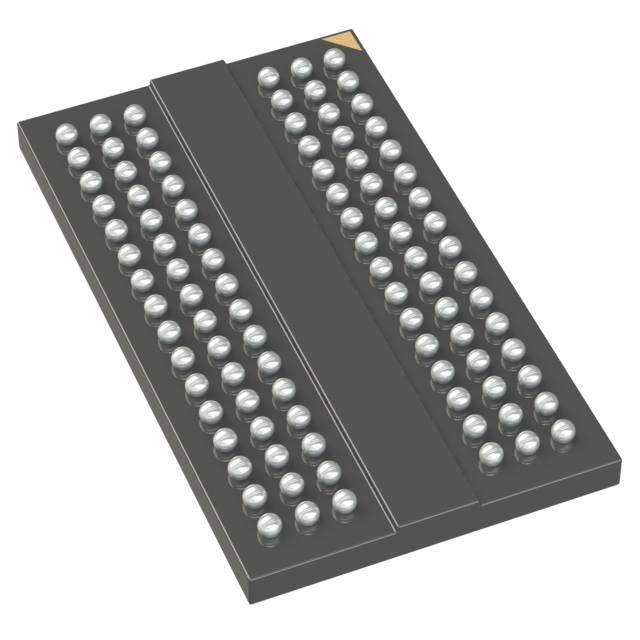
The MT41K256M16TW-107:P Memory Expansion Application Program in Embedded Systems is a DDR3L SDRAM chip designed specifically for embedded systems. It operates at high speeds, significantly enhancing performance in demanding tasks. With its low power consumption, the MT41K256M16TW-107:P is an excellent choice for battery-operated devices. This chip integrates seamlessly with modern systems, providing reliable memory expansion. Whether utilized in IoT gadgets or smart controllers, the MT41K256M16TW-107:P is both efficient and dependable.
Key Takeaways
The MT41K256M16TW-107:P chip has 4Gb DDR3L memory. It moves data quickly and works well in small systems.
This chip uses only 1.35V, so it saves power. It is great for devices that run on batteries.
Setting up the hardware right is very important. Always check the pins and use special capacitors to keep voltage steady.
For software, set up the memory controller and add the right drivers. This helps the chip and system talk to each other easily.
Test and watch how the system works often. This helps find problems early and keeps the chip working well for a long time.
Key Features of MT41K256M16TW-107:P
Memory Size and Speed
The MT41K256M16TW-107:P chip has great memory size and speed. It provides 4Gb of memory, which is a lot for DDR3 chips. This makes it perfect for storing large amounts of data. The chip uses DDR technology, allowing fast data transfers. It supports burst read and write, making tasks run smoothly.
Main features include:
4Gb memory, meeting high DDR3 standards.
DDR design for quicker data transfers.
Burst read and write for better performance.
These features meet industry standards, making the chip dependable for embedded systems.
Voltage and Power Needs
This chip works well with low power, saving energy. It uses 1.35V, which is common for DDR3L chips. This low voltage keeps devices cooler and lasts longer. It’s a great choice for battery-powered devices, balancing power and efficiency.
Data Transfer Design
The MT41K256M16TW-107:P chip has a strong data transfer system. It ensures smooth communication between memory and processor. The table below shows key details:
Metric | What It Means | Value |
|---|---|---|
Clock Speed | How fast it processes instructions, affecting speed. | |
Access Time | Time to get data from memory, showing speed. | 20ns |
Memory Format | How data is stored in the memory chip. | DRAM |
Memory Interface | How the processor talks to the memory chip. | Parallel |
Data Bus Width | Number of bits moved at once, affecting transfer speed. | 16b |
This design allows fast data movement and good memory use, making it ideal for today’s embedded systems.
Ensuring Compatibility with Embedded Systems
Memory Controller Needs
To use the MT41K256M16TW-107:P chip, you need the right memory controller. This chip is made for fast and efficient computing in embedded systems. Many modern controllers work with DDR3 SDRAM chips like this one. These controllers manage data transfer, timing, and power use.
Make sure your memory controller supports DDR3L and runs at 1.35V. It also needs to handle a 16-bit data bus for best performance. This chip is often used in servers and workstations for quick memory tasks, making it a solid choice for embedded systems.
Clock Frequency Support
The MT41K256M16TW-107:P chip works at 933MHz clock speed. This high speed helps with faster data transfers and better processing. Below are the key details about clock frequency:
Specification | Value |
|---|---|
Supported Clock Frequency | 933MHz |
Application Suitability | High-performance computing, gaming, graphics processing |
Importance for Embedded Systems | Faster data transfer rates, better processing speed and efficiency |
Matching your system’s clock speed with the chip ensures smooth operation.
Circuit Diagrams for Applications
To connect the MT41K256M16TW-107:P chip correctly, follow circuit diagrams. These diagrams show how to link power, data, and control lines. For example, the MT41K256M16TW-107 AAT:P TR diagram shows how to connect the chip to the memory controller. Another diagram, the MT47H64M16HR-25E:H, explains DDR3 SDRAM connections.
Chip Model | Description |
|---|---|
MT41K256M16TW-107 AAT:P TR | Diagram shows proper connections for power, data, and control lines. |
MT47H64M16HR-25E:H | Diagram explains how to connect DDR3 SDRAM to the memory controller and system bus. |
Using these diagrams helps set up the chip correctly and avoids mistakes.
Step-by-Step Integration Guide
Hardware Setup and Pin Configuration
To use the MT41K256M16TW-107:P chip, start with hardware setup. First, find the chip’s pin layout in its datasheet. Use this diagram to connect it to the memory controller. Make sure power, ground, and data pins are aligned correctly. Wrong alignment can damage the chip or make it not work.
Next, check the voltage needs. The chip uses 1.35V to operate. Use a steady power supply to prevent voltage changes. Place decoupling capacitors near the power pins. These capacitors reduce noise and keep the voltage stable.
Lastly, check all connections again. Use a multimeter to ensure everything is connected properly. This step makes sure the chip is ready for software setup.
Software Initialization and Drivers
After hardware setup, move to software setup. First, configure the memory controller. Set the clock speed to 933MHz, as the chip requires. Adjust timing settings to match the chip’s needs.
Then, install the right drivers. These drivers let the processor talk to the memory chip. Many systems already have DDR3L SDRAM drivers. If not, create custom drivers using the datasheet.
Finally, test the setup. Use tools to check if the memory controller detects the chip. This step confirms the software is ready.
Testing and Validation Procedures
Testing ensures the chip works well. Start with simple read and write tests. Write data to the chip and read it back to check for errors. Use patterns like 1s and 0s to spot problems.
Next, do stress testing. Run the system at full capacity to check performance. Watch the temperature and power use during this test. The chip is made for low power, so big changes may mean an issue.
Lastly, check system stability. Run the application for a long time. Look for crashes or data errors. This step ensures the chip is ready to use in your system.
Troubleshooting Common Issues
Fixing Compatibility Problems
When adding the MT41K256M16TW-107:P chip, issues may happen. These problems often come from mismatched controllers or wrong clock speeds. To fix this, check if your controller supports DDR3L SDRAM. Make sure it works at 1.35V and matches the chip’s 933MHz speed. Look at your controller’s datasheet to confirm these details.
If the chip isn’t detected, check the pin connections. Loose or misaligned pins can cause problems. Use a multimeter to test and fix the connections. Also, update your system’s firmware or BIOS. Updates often improve how new hardware works with your system.
Solving Performance Problems
Slow performance can happen even with a fast chip. First, check how fast data moves. If it’s too slow, look at the controller’s settings. Wrong timing settings can reduce speed. Adjust them to match the chip’s needs, like CAS latency and burst length.
Heat can also slow things down. Make sure your system stays cool. Add fans or heat sinks near the chip to keep it from overheating. Lastly, check your software. Poor memory use can cause slowdowns. Fix your code to use memory better.
Fixing Startup Errors
Startup errors happen when the chip doesn’t start right. First, check the software setup. Make sure the controller’s drivers are installed and set up correctly. Use tools to see if the controller finds the chip.
If problems continue, check the power supply. Unsteady voltage can stop the chip from starting. Use a stable power source and add capacitors to reduce noise. If nothing works, test the chip in another system. This helps you find out if the problem is with the chip or your setup.
Best Practices for Memory Expansion Optimization
Smart Ways to Manage Memory
Good memory management keeps your system fast and smooth. Start by organizing data better. Put similar data together to save time. Use smart memory allocation, like dynamic allocation. This gives memory only when needed, avoiding waste.
Try caching to speed things up. Caching saves often-used data in quicker memory. This makes getting data faster. For example, if your app repeats tasks, caching helps it run better.
Check memory use often. Tools like memory analyzers find bad memory use. Fixing these problems helps you get the most from the MT41K256M16TW-107:P Memory Expansion Application Program in Embedded Systems.
Keeping Cool and Power Steady
Cooling and steady power are key for memory to work well. Heat can harm the chip and shorten its life. Add heat sinks or fans near the chip to cool it. For small devices, use thermal pads or special materials to handle heat.
Power must stay steady too. Voltage changes can stop the chip from working. Use a regulated power source to keep 1.35V for the MT41K256M16TW-107:P chip. Add decoupling capacitors near power pins to keep voltage stable and cut noise.
Tip: Clean cooling parts often. Dust blocks airflow and makes heat worse.
Watching System Performance Often
Watching your system helps find and fix problems early. Use tools to check memory, temperature, and power use. These tools show real-time data to spot issues.
Set alerts for things like high temperature or voltage. If limits are passed, the system warns you to fix it. Stress testing is also helpful. It checks if the chip works well under heavy use.
By doing these steps, your memory expansion stays reliable and efficient.
The MT41K256M16TW-107:P chip is great for boosting memory. It works fast, uses little power, and fits with modern controllers. Setting it up right, both hardware and software, helps it work best. Testing makes sure there are no problems and keeps the system steady. Using smart memory tricks and checking often keeps your system running well for a long time.
FAQ
Why is the MT41K256M16TW-107:P chip good for embedded systems?
This chip works fast, uses little power, and fits DDR3L controllers. It runs on 1.35V, saving energy. This makes it great for IoT devices and portable gadgets.
Tip: Pick this chip for systems needing reliable memory upgrades.
How can you set up the pins correctly during hardware setup?
Check the datasheet for the pin layout. Match power, ground, and data pins properly. Use a multimeter to check connections. Add capacitors near power pins to keep voltage steady and reduce noise.
Note: Wrong pin setup can harm the chip or cause issues.
Can the MT41K256M16TW-107:P chip handle demanding tasks?
Yes, it runs at 933MHz and has a 16-bit data bus. This allows quick data transfers, making it great for gaming, graphics, and real-time tasks.
What tools help check system performance with this chip?
Use memory tools to see how memory is used. Stress-test tools check performance under heavy use. Set alerts for heat or voltage changes to avoid problems.
Emoji Tip: 🛠️ Regular checks keep your system working well.
How do you fix startup problems?
Check the controller’s drivers and settings. Make sure the power supply gives a steady 1.35V. Test the chip in another device to find hardware problems.
Pro Tip: Update firmware to improve how the chip works with your system.
See Also
XCF04SVOG20C Chip: Best Option For 4Mb Setups
Unlock High-Speed I/O Growth Using EPM1270T144C5N
The W25Q256JVEIQ: An Excellent Fit For Embedded Systems
STM32G030F6P6TR: Create More Intelligent Embedded Systems Today
Managing Data Storage And Configuration With AT24C02C-SSHM-T Chip